12 Holiday Cyber Scams of December (and How to Avoid Them)

Author: Marie Strawser, UMSA Managing Director
December 3, 2025
A Business Guide for Year-End Security
December is one of the most dangerous months for organizations. Employees are distracted, IT teams are stretched thin, and many companies operate with reduced staffing during the last two weeks of the year. Cybercriminals are aware of this—and they consistently exploit the holiday season with highly targeted attacks.
From phishing campaigns disguised as shipping notifications to fraudulent invoices and credential harvesting, year-end scams can lead to data breaches, payroll fraud, business email compromise (BEC) scams, and costly downtime.
This guide outlines 12 holiday cyber scams that businesses must be prepared for in December, along with the practical steps your organization can take to reduce risk.
1) Fake Online Stores Targeting Company Cards
 Employees often make year-end purchases on behalf of the company, including equipment, gifts, event supplies, and travel. Attackers create legitimate-looking websites designed to capture corporate card numbers or deliver malware.
Risks to businesses:
- Corporate credit card theft
- Drive-by malware downloads
- Fake invoices or fraudulent chargebacks
How to mitigate:
- Require employees to purchase only from preapproved vendors
- Use virtual cards with spend limits
- Block risky domains with DNS filtering
2) Gift Card Scams
Holiday-themed BEC scams surge in December. Attackers impersonate executives, asking employees to urgently purchase gift cards “for client appreciation” or for internal events.
Organizational impact:
- Direct financial loss
- Increased exposure to follow-up phishing attacks
- Reputational harm if clients are targeted
Controls:
- Train staff to verify all unexpected requests
- Create explicit internal policies forbidding gift card purchases via email
3) Shipping & Delivery Phishing Emails
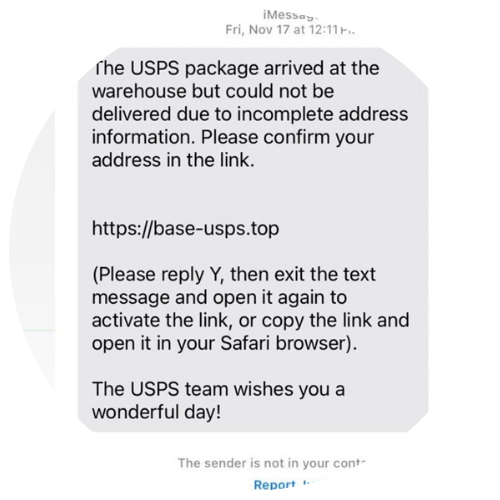 Corporate mailrooms and administrative staff are frequent targets. Fake FedEx/UPS/USPS notices are used to deliver credential phishing or malware.
Business consequences:
- Compromised email accounts
- Initial access for ransomware groups
- Malware spread within the network
Best practices:
- Block attachments from unknown senders
- Route all tracking through official carrier portals
- Provide a straightforward process for verifying package notifications
4) Fake Charities Targeting Employee Generosity
Scammers leverage corporate giving programs and match incentives. Employees may donate through fake sites using company email accounts, exposing corporate data.
Risks:
- Business email compromise via reused credentials
- Misuse of company philanthropic messaging
- Employee financial loss
What to implement:
- Publish a vetted list of approved charities
- Block known fraudulent donation domains
- Add reminders about secure giving practices
5) Travel Booking Scams Hitting Corporate Travelers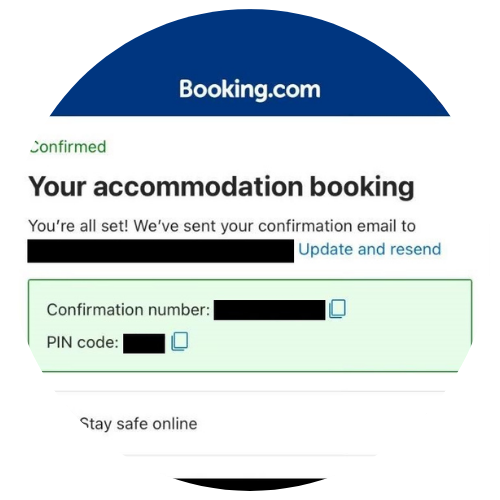
Year-end business travel, conferences, and relocations increase the attack surface.
Threats include:
- Fake booking confirmations
- Spoofed hotel and airline websites
- Fraudulent loyalty program scams
Mitigation:
- Require travel booked through a centralized platform
- Enable MFA for travel portals
- Provide employees with a checklist for verifying reservations
6) Fake Purchase Orders & Invoice Scams
Attackers send fraudulent invoices or PO confirmations disguised as holiday procurement rushes.
Why it works:
Finance teams are often overwhelmed by year-end processing, and attackers capitalize on the resulting urgency and volume.
Controls:
- Mandatory secondary approval for late-year invoices
- Verification of vendor bank account changes
- Invoice-matching automation to reduce manual mistakes
7) Fake Social Media Giveaways Targeting Company Accounts
Corporate social channels are targeted with phishing links, fa ke partner “collabs,” and credential harvesting campaigns.
Impact:
- Hijacked social media accounts
- Brand damage
- Loss of customer trust
Prevention:
- Require Multi-Factor Authentication on all social accounts
- Centralize account ownership under the marketing or IT team
- Train staff not to click unsolicited offers
8) Malicious Holiday E-Cards Sent to Employees
Attackers disguise malware as digital holiday cards from vendors, clients, or the Human Resources department.
Potential damage:
- Ransomware delivery
- Credential theft
- Lateral movement within corporate networks
Reduce risk by:
- Sandboxing attachments
- Automatically blocking unknown executable files
- Sending employees examples of legitimate e-card platforms
9) Fake Tech Support Targeting New Company Devices
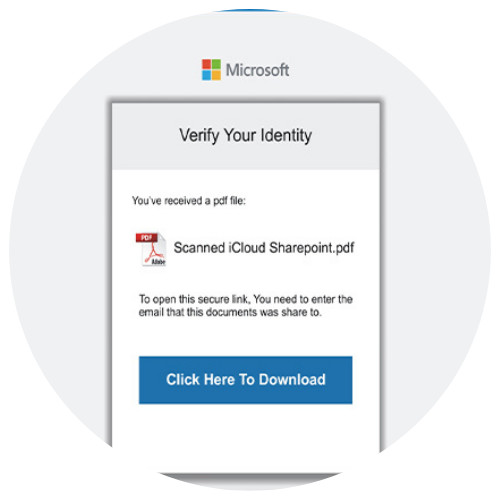 As organizations distribute laptops or upgrade equipment before the end of the year, attackers trigger fake pop-ups to trick employees into granting remote access.
Business impact:
- Complete endpoint compromise
- Unauthorized software installation
- Data theft
Mitigation:
- Lock down admin permissions
- Configure browser pop-up blockers
- Remind employees that IT will never ask for remote access via pop-up warnings
10) Counterfeit Hardware & IT Accessories
Last-minute procurement—such as cables, webcams, chargers, and peripherals—opens the door to counterfeit or malicious hardware.
Risks:
- Hardware keyloggers
- Firmware tampering
- Electrical hazards
Mitigation:
- Centralize hardware purchasing
- Use vetted, authorized resellers
- Track inventory with serial numbers
11) Subscription Renewal Phishing
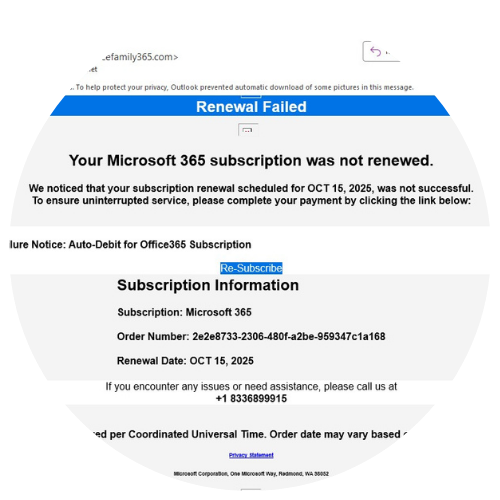 Attackers send fake renewal notices for widely used business software (Microsoft 365, Adobe, QuickBooks, security tools).
Risks:
- Payment fraud
- Employees entering credentials into phishing sites
- Unauthorized access to cloud services
To reduce exposure:
- Maintain a clear inventory of SaaS subscriptions
- Route renewals through IT or procurement only
- Block known renewal-themed phishing domains
12) “Employee Gift Exchange” & Peer-to-Peer Payroll Scams
Cybercriminals can infiltrate your company’s Slack, Teams, or email to launch fake Secret Santa programs or peer-to-peer payment requests.
Impact:
- Employee financial loss
- Internal communication compromise
- Loss of trust in collaboration platforms
Prevent it with:
- Strong access controls on internal channels
- Employee reminders that company gift exchanges never require payments
- Automated monitoring for suspicious mass messages
Year-End Corporate Cybersecurity Checklist
Share this with managers and employees:
Technical Controls
- Enforce Multi-factor Authentication companywide
- Patch critical systems before the holiday break
- Strengthen email filtering and sandboxing
- Enable DNS filtering to block risky domains
- Review admin privileges and disable unused accounts
- Verify backups and test restorations
Operational Readiness
- Ensure 24/7 monitoring is in place
- Define escalation paths for holiday incidents
- Conduct a brief year-end access review
- Alert employees about seasonal scams
Employee Training Reminders
- Verify all payment- or gift-related emails
- Avoid using personal devices for corporate logins
- Report suspicious emails immediately
- Don’t make unapproved purchases with company funds
Final Thoughts
Cybercriminals take advantage of the end-of-year crunch, which is characterized by reduced staffing, distracted employees, and an increase in financial transactions. But with clear policies, well-tuned security controls, and proactive communication, businesses can dramatically reduce their exposure to holiday-season attacks.